
Purim 101
Curious about how our annual Purim Mitzvah works? Watch the 2-minute video below, or scroll down a bit to read actual words.
What is a Purim bag?
On Purim, we celebrate the day of deliverance by feasting, rejoicing, and honoring the longstanding tradition of sending mishloach manot, gifts of snacks and treats packed in an attractive, reusable tote.
By participating, members can say “I appreciate you!” and support the Oheb community at a giving level of your choice.
You can also help your fellow congregants through a meaningful volunteer aspect, delivering bags to your friends and neighbors.
Who receives a tote bag?
Everyone in the Oheb community will receive a Purim tote bag filled with goodies, along with a list of those who contributed to them.
How do I send a tote bag?
You may:
- Send Purim treats & wishes to individuals/families and/or specific groups of people (e.g. Board, staff, etc) ($7 each tote bag)
- Reciprocate to those who send Purim treats & wishes to you ($7 each tote bag, billed at the close of the Campaign)
- Send Purim treats & wishes to EVERYONE in the Oheb community, including members, staff, teachers, and clergy ($540)
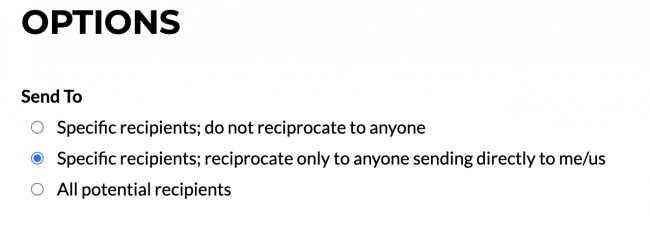
Note: In sending tote bags, you can choose whether you want to do “reciprocal sending,” which means that anyone who purchases a tote bag for you will receive one from you in return!
Registration closes on Sun, Feb 15 at 5 pm.
Okay, I’m ready to go. What next?
1. Visit the order form.
2. Make sure you are logged into your ShulCloud account.
3. You’ll see a page that looks like this:
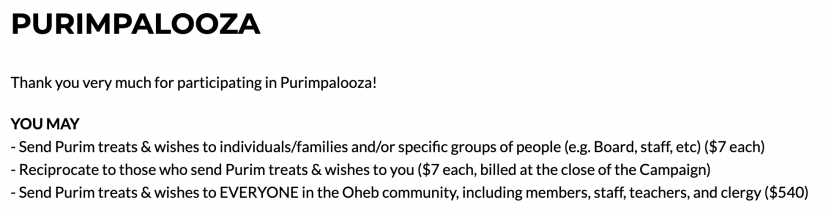
4. You’ll make your choice to reciprocate or not to reciprocate in this area (be sure to check the appropriate radio button!):
5. Here’s where you choose your individual recipients:
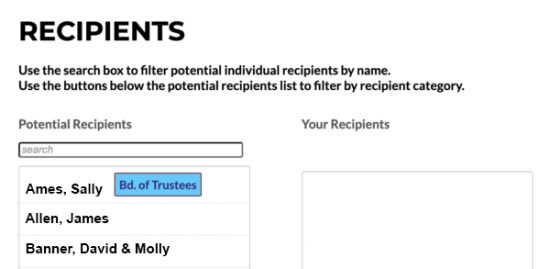
6. Click on a name on the left to move it into the right column. To remove the name, click on it again to move it back into the left column.
6a. To select EVERYONE, click the arrow and the word “ALL” in between the two columns.
7. To recognize specific groups that serve the community of Oheb, such as clergy, staff, faculty, and trustees, or to welcome new members, those groups are organized on the selection page. And you can recognize anyone within those groups with the gift of a Purim tote bag. Click the button in the lower left hand corner (and note: you may give to more than one group).

Note: If during the campaign you realize that you forgot someone, you’re welcome to log back into your account and make additional selections; you’ll be only charged for those additional Purim totes (since you already paid for your initial order). To ensure the old names don’t come up, we recommend clearing your browser cache before adding names.
8. Next, select your tote bag delivery method: would you like it delivered to your home, or would you like to donate it?

9. Next is our “volunteer” section. If you would be willing to help deliver tote bags, click the SignUp Genius link.

10. Below this section, you’ll see your monetary total and the number of recipients selected.

11. Click CONTINUE, and you’ll be taken to the CONFIRM PAYMENT screen, which will remind you of the amount and ask how you’d like to pay. (If you have a card or eCheck on file, that info will appear.)
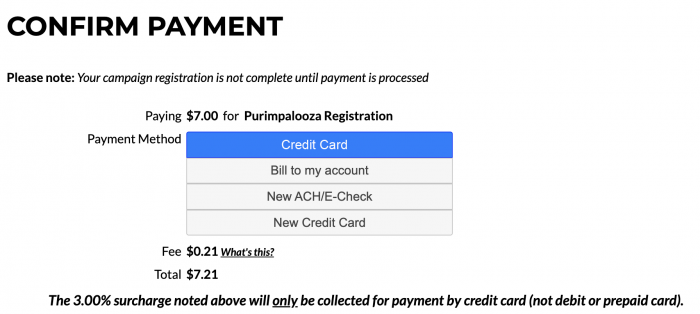
12. After you submit your payment information, you’ll see the THANK YOU screen, which indicates that your order was a success! You’ll receive a confirmation email with your tote bag recipients and the payment total. Hang on to this for future reference!
And that’s all there is to it! Go to the form now.
Just remember: registration closes on Sun, Feb 15 at 5 pm. If you selected reciprocity, you will be charged for those people after the campaign closes.
Note: In your Purim tote bag, you will receive your personalized Purim card with a listing of those who have “gifted” you.
Thank you for taking part!